
INDUSTRY EXPERIENCE = REAL SOLUTIONS
SimVIS works with the some of the most versatile Simulator manufacturers including L3-Harris, Acron Aviation, FlightdeckSolutions,
Elite and RealSimGear to provide complete "out the window" packages based on COTS IG's such as Prepar3D and XPlane.
Other options can include a HD and 4K projector resolutions, computer architecture, Curved Screen design and TruVIEW Software.
With over 15 years hands on experience, we have developed tools and techniques to deliver seamless and “Natural looking”, ”Real World View” and “Geometrically Correct” Flight Simulator Visual Systems.
Benefits of Curved/Surround Displays in flight simulator training?
Our Surround Visual System is “Front Projected” in HD or 4K-UHD, and can improve flight simulator training mainly by making the on-screen world feel more “wrapped around” you—so your eyes and head can naturally scan instruments and the outside scene with less mismatch.
Key training improvements:
1) Better visual immersion (more consistent viewpoint)
A curved screen better matches the way human vision works across a wide field of view. Instead of the outside world appearing “flat” and stretched at the edges, the curvature helps the cockpit scene feel more continuous—especially when trainees look left/right at the horizon, taxiways, or traffic.
2) Less eye strain during instrument scanning
Instrument flying often requires repeated saccades (quick eye movements) across panels (e.g., PFD/ND/MFD, radios, engine instruments). With a flat display, edge regions can look farther off-axis, increasing the visual effort to focus and align. A curved display typically reduces that off-axis distortion, which can make long training sessions feel more comfortable and readable.
3) More natural head/eye alignment
In many simulators, trainees move their head to “look” out the window or check left/right instruments. Curvature reduces the visual mismatch between:
-
where the cockpit scene “seems” to be, and
-
where your eyes are actually looking. This can improve scan patterns and situational awareness.
4) Improved peripheral usability (especially in approach/traffic)
Curvature can make elements near the edges of the display—like runway centerline cues, traffic targets, or terrain features—feel less distorted. That helps during tasks where attention swings between the primary instrument area and peripheral visual cues (e.g., sequencing for approach, maintaining visual references, spotting other aircraft).
5) Potential reduction in distance/scale illusions
Flat displays can create stronger perspective distortion at the edges when the viewer is not perfectly centered. With a properly designed curve and viewing distance, the simulator can maintain more consistent geometry across the visible area—useful for training pitch/power management, scanning techniques, and landing/rollout tasks.
Benefits of 4K UHD displays for flight simulators?
1) Much sharper detail
-
Higher pixel density makes gauges, labels, runway markings, signage, and cockpit panel text look crisper.
-
This reduces the “blurriness” you can get when you’re trying to read small text at typical viewing distances.
2) Better ability to distinguish scenery at distance
-
With 4K’s extra resolution, ground textures, buildings, terrain features, and distant objects tend to look more defined.
-
You may notice improvements when flying low over cities/terrain or when approaching airports.
3) More usable image clarity on a wider FOV setup
-
Flight sims often benefit from larger fields of view (and triple-screen or ultra-wide setups).
-
A 4K display can help keep that wider view from becoming “pixel-y,” especially if you’re sitting far enough back that many lower-res screens lose fine detail.
4) Improved cockpit immersion
-
In most sims, cockpit immersion comes from being able to read and perceive the cockpit correctly.
-
4K can make control markings, switches, knobs, and text feel less abstract—so the cockpit looks more “real.”
5) Better scaling for modern UI and cockpit mods
-
Many flight sim elements (especially newer UI elements, textures, and aircraft mods) are designed around higher-resolution textures.
-
4K helps those assets look closer to how they were intended.
SimVIS can tailor a Visual System to suit your budget and needs.
Whether it be an upgrade from HD to 4K, to a multi-channel FNTP-II HD/Level 5 FTD 220VFOV system for aircraft trainers,
Helicopter and eVTOL, ATC Simulators and Vehicle Simulators, SimVIS can provide a complete solution.

The GA Collection
From General Aviation to Fast Jet Simulators.
180 to 220FOV in HD or 4K-UHD
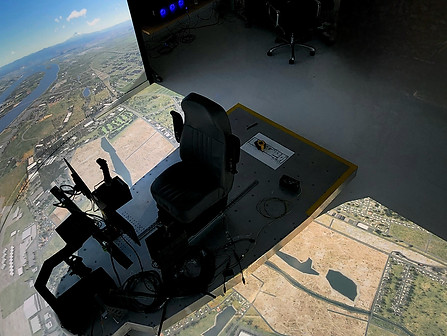
eVTOL and Helicopter
The Ulitmate Viewing Experience. Critical Mission Terrain View in Immersive 200x80 FOV 4K-UHD

